> For the complete documentation index, see [llms.txt](https://rc.sunbird.org/llms.txt). Markdown versions of documentation pages are available by appending `.md` to page URLs; this page is available as [Markdown](https://rc.sunbird.org/sunbird-rc/v1.0.0/reference-solutions-for-functional-registries/education/education-ecosystem/installation.md).
# Installation
### Knowledge Needed
A good understanding of docker, docker-compose & nginx
### Prerequisites
#### Docker
Installation instructions for Docker can be found [here](https://docs.docker.com/engine/install/).
Run `docker -v` in terminal to check if `docker` has been installed correctly:
```
$ docker -v
Docker version 20.10.9, build c2ea9bc90b
```
#### Docker Compose
Installation instructions can be found [here](https://docs.docker.com/compose/install/).
Run `docker compose version` in the terminal to check if `docker compose` has been installed correctly:
```
$ docker compose version
Docker Compose version 2.0.1
```
### Backend Setup
### Getting Code for Backend
Clone the repo
```bash
git clone https://github.com/Sunbird-RC/demo-education-registry.git
git checkout federated_edu_registry
```
This will create a demo-education-registry folder in the current working directory. Goto that folder
### Setting up a Registry Instance
In the demo-education-folder, run the following command
```bash
docker compose up -d
```
This will start all the required services. Once all the services are started, Go to the browser and open . This will open up the keycloak admin portal. Use username as `admin` and password as `admin`.
Once logged in, navigate to `clients`. Select `admin-api`. Go to `credentials` tab and click on regenerate secret. Copy this secret. Create a .env file in the project repo and add `KEYCLOAK_SECRET` it as an environment variable with the value of the secret in the following format\
`KEYCLOAK_SECRET=`

Recreate the registry so that it reflects the keycloak secret. This can be done using
```bash
docker compose up -d --force-recreate --no-deps registry
```
If any service has not started you can recreate that service with the same command
```bash
docker compose up -d --force-recreate --no-deps
```
Check if all the services are started
```bash
docker compose ps
```
```bash
NAME IMAGE COMMAND SERVICE CREATED STATUS PORTS
demo-education-registry-adhoc_worker-1 redash/redash:8.0.0.b32245 "/app/bin/docker-ent…" adhoc_worker About a minute ago Up About a minute 5000/tcp
demo-education-registry-certificate-api-1 ghcr.io/sunbird-rc/sunbird-rc-certificate-api "docker-entrypoint.s…" certificate-api 17 hours ago Up 17 hours (healthy) 0.0.0.0:8078->8078/tcp, :::8078->8078/tcp
demo-education-registry-certificate-signer-1 ghcr.io/sunbird-rc/sunbird-rc-certificate-signer "docker-entrypoint.s…" certificate-signer 17 hours ago Up 17 hours (healthy) 0.0.0.0:8079->8079/tcp, :::8079->8079/tcp
demo-education-registry-claim-ms-1 ghcr.io/sunbird-rc/sunbird-rc-claim-ms:v0.0.13 "java -jar /app.jar" claim-ms About a minute ago Up About a minute 0.0.0.0:8082->8082/tcp, :::8082->8082/tcp
demo-education-registry-clickhouse-1 clickhouse/clickhouse-server:head-alpine "/entrypoint.sh" clickhouse 17 hours ago Up 17 hours (healthy) 8123/tcp, 9009/tcp, 0.0.0.0:9004->9000/tcp, :::9004->9000/tcp
demo-education-registry-db-1 postgres "docker-entrypoint.s…" db About a minute ago Up About a minute 0.0.0.0:5432->5432/tcp, :::5432->5432/tcp
demo-education-registry-digilocker_certificate_api-1 sunbirdrc/sunbird-rc-digilocker-certificate-api "/go/main" digilocker_certificate_api About a minute ago Up About a minute 8086/tcp, 0.0.0.0:8087->8087/tcp, :::8087->8087/tcp
demo-education-registry-es-1 docker.elastic.co/elasticsearch/elasticsearch:7.10.1 "/tini -- /usr/local…" es 17 hours ago Up 17 hours (healthy) 0.0.0.0:9200->9200/tcp, :::9200->9200/tcp, 0.0.0.0:9300->9300/tcp, :::9300->9300/tcp
demo-education-registry-file-storage-1 quay.io/minio/minio "/usr/bin/docker-ent…" file-storage 17 hours ago Up 17 hours (healthy) 0.0.0.0:9003->9000/tcp, :::9003->9000/tcp, 0.0.0.0:9002->9001/tcp, :::9002->9001/tcp
demo-education-registry-kafka-1 confluentinc/cp-kafka:latest "/etc/confluent/dock…" kafka 17 hours ago Up 17 hours (unhealthy) 0.0.0.0:9092->9092/tcp, :::9092->9092/tcp
demo-education-registry-keycloak-1 ghcr.io/sunbird-rc/sunbird-rc-keycloak:nonce "/opt/jboss/tools/do…" keycloak About a minute ago Up About a minute (health: starting) 0.0.0.0:8080->8080/tcp, :::8080->8080/tcp, 0.0.0.0:9990->9990/tcp, :::9990->9990/tcp, 8443/tcp
demo-education-registry-metrics-1 ghcr.io/sunbird-rc/sunbird-rc-metrics:metrics "/app/metrics/metric…" metrics 17 hours ago Up 2 minutes 0.0.0.0:8070->8070/tcp, :::8070->8070/tcp
demo-education-registry-nginx-1 ghcr.io/sunbird-rc/sunbird-rc-nginx "/docker-entrypoint.…" nginx About a minute ago Restarting (1) 26 seconds ago
demo-education-registry-redis-1 redis "docker-entrypoint.s…" redis 17 hours ago Up 17 hours 0.0.0.0:6379->6379/tcp, :::6379->6379/tcp
demo-education-registry-registry-1 ghcr.io/sunbird-rc/sunbird-rc-core:metrics "java -Xms1024m -Xmx…" registry About a minute ago Up About a minute 0.0.0.0:8081->8081/tcp, :::8081->8081/tcp
demo-education-registry-scheduled_worker-1 redash/redash:8.0.0.b32245 "/app/bin/docker-ent…" scheduled_worker About a minute ago Up About a minute 5000/tcp
demo-education-registry-scheduler-1 redash/redash:8.0.0.b32245 "/app/bin/docker-ent…" scheduler About a minute ago Up About a minute 5000/tcp
demo-education-registry-server-1 redash/redash:8.0.0.b32245 "/app/bin/docker-ent…" server About a minute ago Up About a minute 0.0.0.0:5678->5000/tcp, :::5678->5000/tcp
demo-education-registry-zookeeper-1 confluentinc/cp-zookeeper:latest "/etc/confluent/dock…" zookeeper 17 hours ago Up 17 hours 2888/tcp, 0.0.0.0:2181->2181/tcp, :::2181->2181/tcp, 3888/tcp
```
### Setting up Keycloak
**Adding Roles**
Open in the browser and navigate to roles in the left side pane. Click on Add Role.
.png?alt=media)
Create `admin`, `scholarship`, `trial-scholarship` roles

Create `admin` user in keycloak

Update the credential for the `admin` user. `Ex: abcd@123`
.png?alt=media)
Assign `admin` role to this user

Now you can use the `admin` user to create issuers, create schemas, issue VCs and view issued VCs\
You can follow the following [jupyter notebook](https://github.com/varadeth/demo-education-registry/blob/issue_624_backend_eer_docs/issuance.ipynb) which has all the APIs.
**Note**:-
* Schemas for EER are present in the following location
{% embed url="" %}
#### Assign \`admin\` role to the issuer
* An issuer will require `admin` role to create schemas in the registry.
* Goto keycloak admin console,
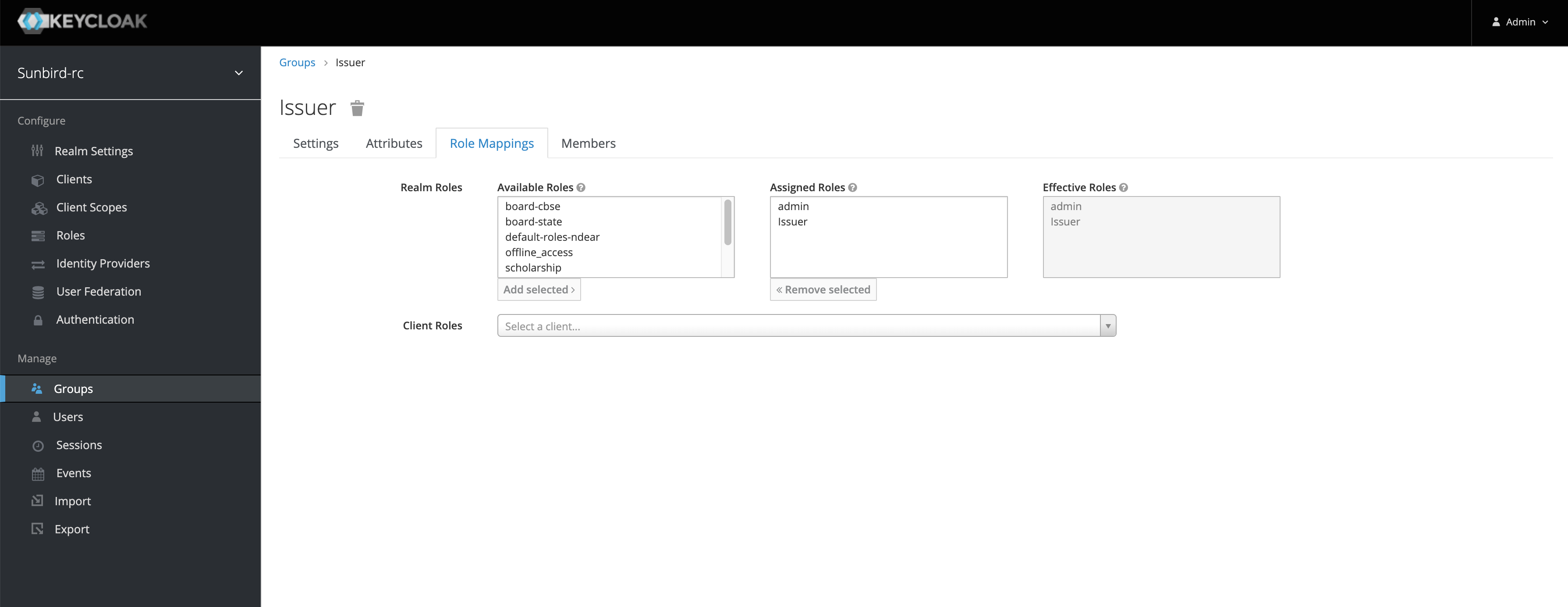
* Goto `Groups` and double-click on `Issuer`
* If `Issuer` group is not found, then you need to create an issuer first. The APIs to create the issuer is documented in the above jupyter notebook.
* Goto `Role Mappings` and select `admin` from `Available Roles` and click `Add Selected`
The issuer will require the same roles that are configured in the schema configuration to issue VCs for that schema. In the below sample schema, `ScholarshipForTopClassStudents` it requires a user to have `scholarship` role. Only if the issuer contains that role then he will be able to issue VC. Similar to the above steps, you can assign the `scholarship` roles to the issuer to get access.
{% embed url="" %}
### Setting up Redash
How to configure
Once all the services are up and running, run the following command
```bash
docker compose run --rm server create_db
```
This command will run migrations for redash
Once this is successful, open the in the browser. The following screen should be displayed

You can create the admin user on this screen. Once you create the admin user, the admin user will be displayed. Here you can create a dashboard, queries etc. Create a dashboard and queries here

#### Connect to the data source
* On the home page click on `Connect a Data Source`
* Search for `Clickhouse`
* Add these details on the form to set up a connection with Clickhouse

Now that you have connected to Clickhouse, you can create queries. Once a query is created, you can add your visualization for the same.
#### Create a query and visualization
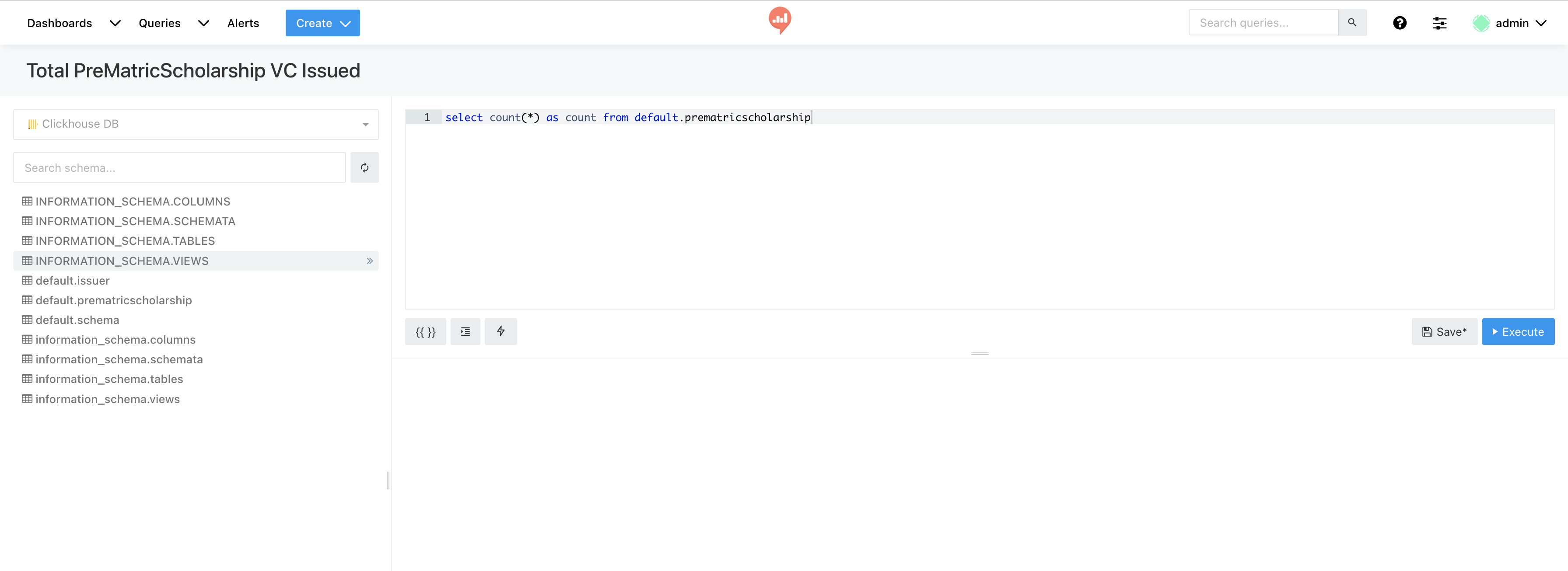
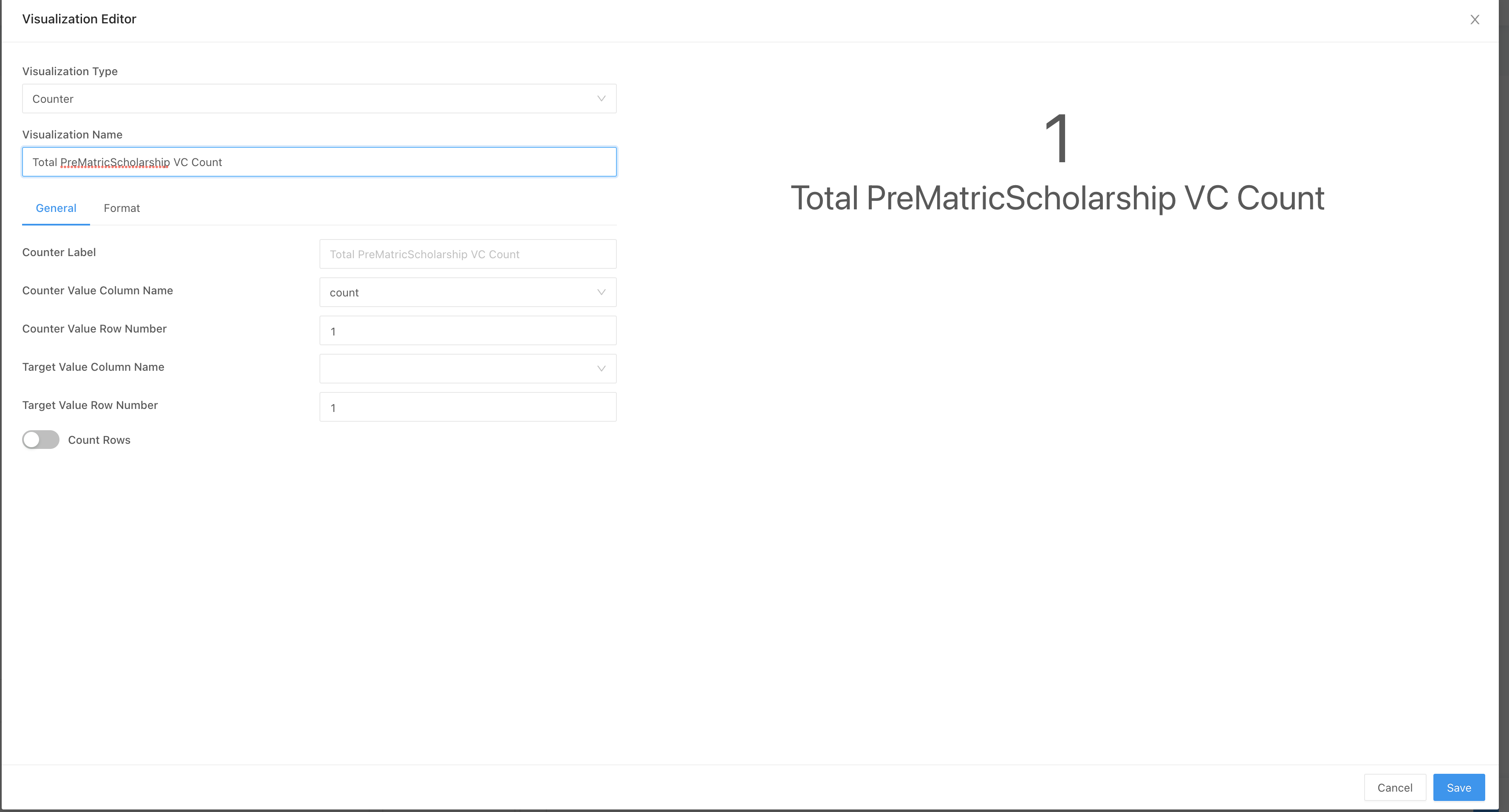
Create a visualization showing the total number of VCs issued for `PreMatricScholarship` schema.
* Goto `Queries` tab
* Click on `Create your first Query`
* Paste the below query and click on `Save`
`select count(*) as count from default.prematricscholarship`
* Rename this query `New Query` to `Total PreMatricScholarship VC Issued`
* Click on `Save` and click on `Publish`
* Click on `Show Data Only`
* At the bottom click on `Blue Play Button`
* Click on `+ New Visualization`
* Create a visualization with the below values. And click on `Save`
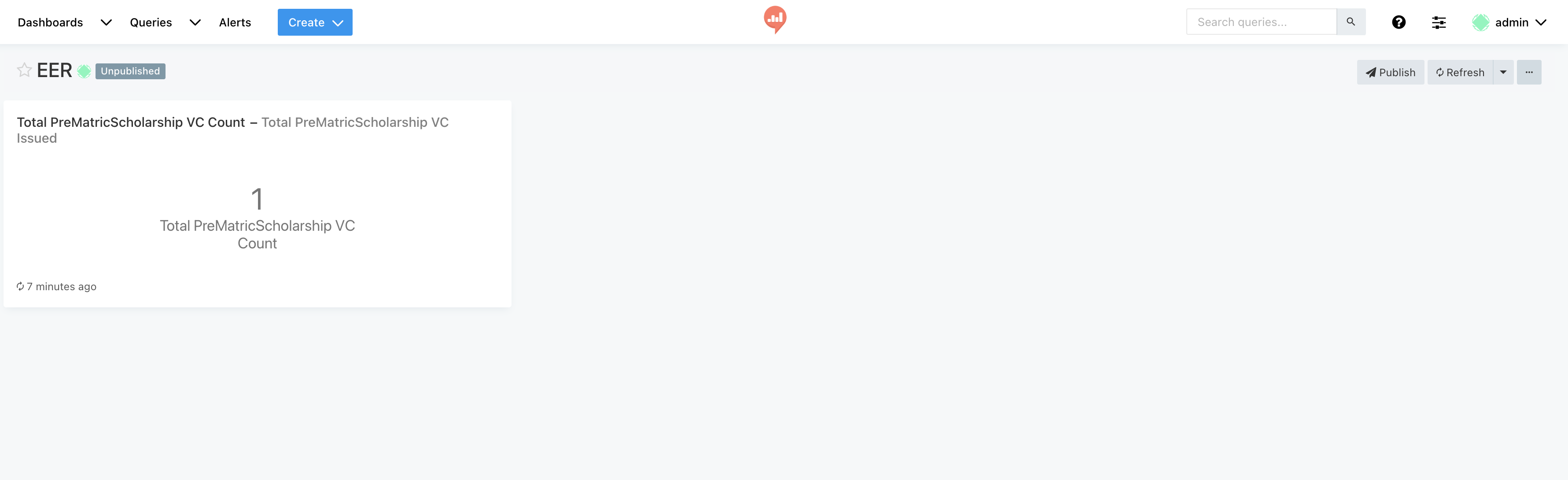
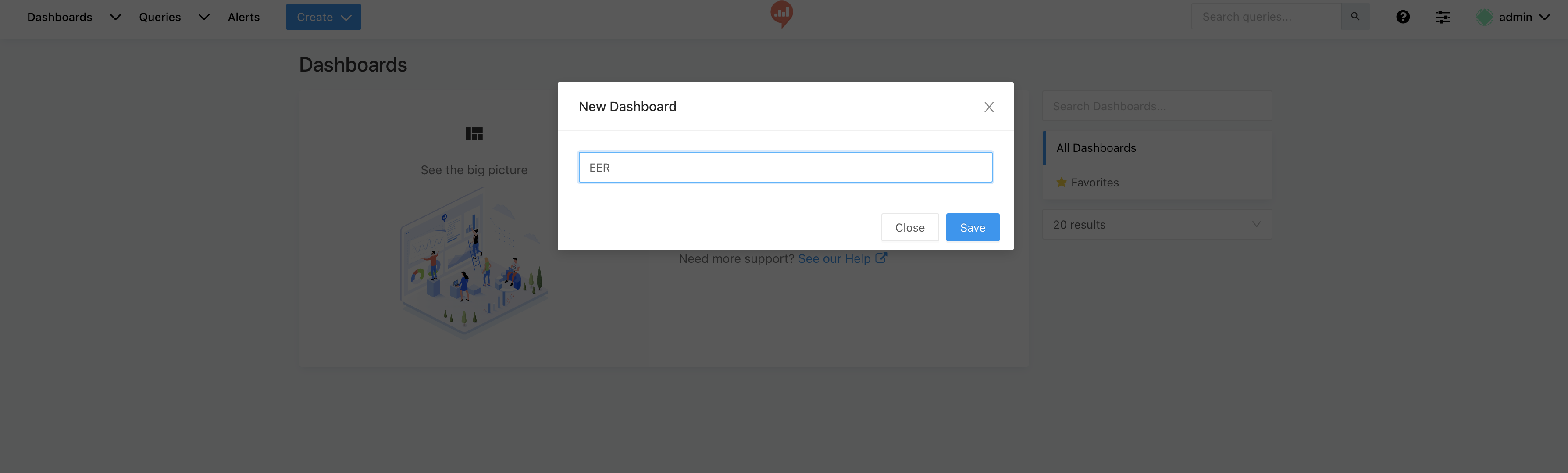
* Click on `Create` and click on `Dashboard`. You can give a name to your dashboard and click on `Save`
* Click on `Add Widget` and select the new visualization created. And click `Add to Dashboard`
* Click on `Done editing` and click on `Publish`
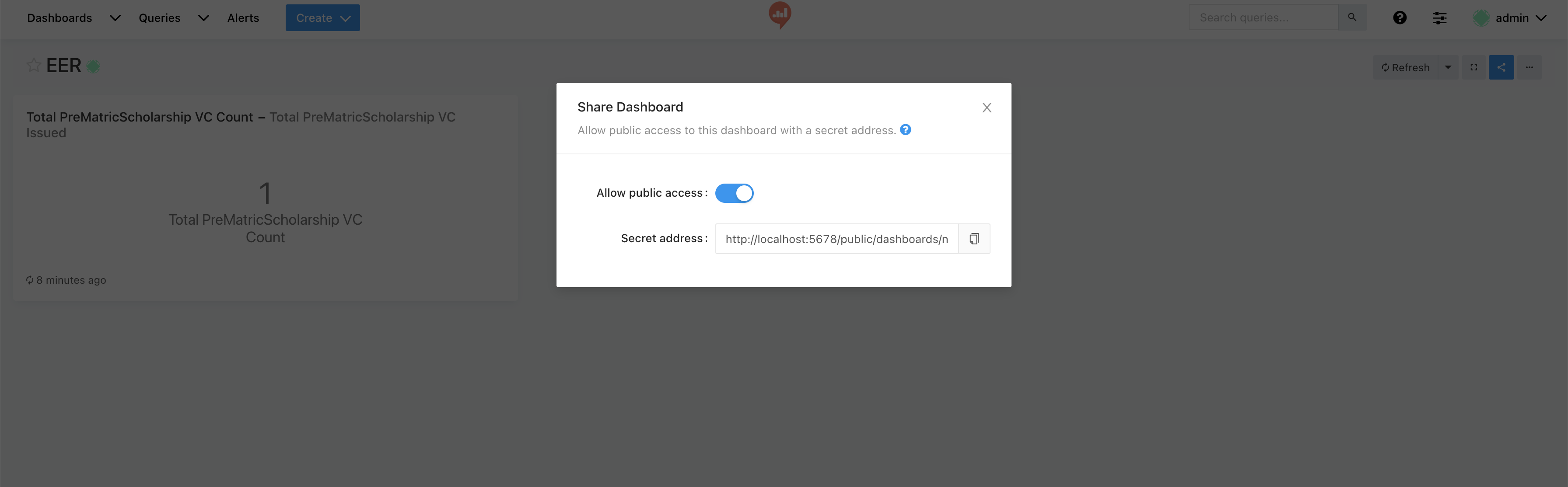
* Now the dashboard can be shared with other members. Click on `Share` and enable `public access` and copy the URL and share it with others for viewing the dashboard
### Frontend Setup
* Navigate to this repository and create a fork & clone
* Navigate to the federated-education-registry folder
.png?alt=media)
* Make sure your node and npm versions are - node v16.13.1 (npm v8.1.2)
You can also manage these versions using [Node Version Manager](https://www.freecodecamp.org/news/node-version-manager-nvm-install-guide/)
.png?alt=media)
---
# Agent Instructions
This documentation is published with GitBook. GitBook is the documentation platform designed so that both humans and AI agents can read, navigate, and reason over technical content effectively. Learn more at gitbook.com.
## Querying This Documentation
If you need additional information that is not directly available in this page, you can query the documentation dynamically by asking a question.
Perform an HTTP GET request on the current page URL with the `ask` query parameter, and the optional `goal` query parameter:
```
GET https://rc.sunbird.org/sunbird-rc/v1.0.0/reference-solutions-for-functional-registries/education/education-ecosystem/installation.md?ask=&goal=
```
`ask` is the immediate question: it should be specific, self-contained, and written in natural language.
`goal` is optional and describes the broader end goal you are ultimately trying to accomplish on behalf of the user. GitBook uses it to tailor the answer towards what is most useful for that goal.
The response will contain a direct answer to the question and relevant excerpts and sources from the documentation.
Use this mechanism when the answer is not explicitly present in the current page, you need clarification or additional context, or you want to retrieve related documentation sections.
.png?alt=media)