> For the complete documentation index, see [llms.txt](https://rc.sunbird.org/llms.txt). Markdown versions of documentation pages are available by appending `.md` to page URLs; this page is available as [Markdown](https://rc.sunbird.org/engage/use-case-walkthroughs.md).
# Use case Walkthroughs
Short videos showing Sunbird RC in action for real-world use cases.
These videos walk through how Sunbird RC's Registry and Credentials components can be used for a specific domain. Each demo shows a reference flow — from creating records to issuing and verifying credentials — rather than a particular production deployment.
## Education
{% columns %}
{% column width="58.333333333333336%" %}
English
**Where the student’s journey begins ?**
* A brand new wallet on the student’s phone, with nothing in it yet
* A PIN binds the wallet to this device, so it can’t be copied elsewhere
* Fingerprint unlock can be added for faster, everyday access
* Three registries are ready to issue: School, College, and University
Português (Brasil)
**Onde a jornada do estudante começa ?**
* Uma carteira nova no celular do estudante, ainda sem nada dentro
* Um PIN vincula a carteira a este aparelho, impedindo que seja copiada para outro
* A digital pode ser adicionada para um desbloqueio mais rápido no dia a dia
* Três registros prontos para emitir: Escola, Faculdade e Universidade
Español
**¿Dónde comienza el recorrido del estudiante?**
* Una billetera nueva en el teléfono del estudiante, todavía vacía
* Un PIN vincula la billetera a este dispositivo, para que no pueda copiarse a otro
* Se puede agregar el desbloqueo con huella digital para un acceso más rápido en el día a día
* Tres registros listos para emitir: Escuela, Instituto y Universidad
{% endcolumn %}
{% column width="41.666666666666664%" %}
{% endcolumn %}
{% endcolumns %}
***
{% columns %}
{% column width="58.333333333333336%" %}
English
**Credentials that belong to the student**
* Each registry issues a digital credential directly to the wallet
* School, college, and university records now sit in one place
* The wallet is closed and reopened, and all three credentials are still there
* No re-downloading, no requesting copies from each institution again
Português (Brasil)
**Credenciais que pertencem ao estudante**
* Cada registro emite uma credencial digital direto para a carteira
* Os registros da escola, faculdade e universidade ficam em um só lugar
* A carteira é fechada e reaberta, e as três credenciais continuam lá
* Sem baixar de novo, sem pedir cópias a cada instituição
Español
**Credenciales que pertenecen al estudiante**
* Cada registro emite una credencial digital directamente a la billetera
* Los registros de la escuela, el instituto y la universidad quedan en un solo lugar
* La billetera se cierra y se vuelve a abrir, y las tres credenciales siguen ahí
* Sin volver a descargar, sin pedir copias a cada institución
{% endcolumn %}
{% column width="41.666666666666664%" %}
{% endcolumn %}
{% endcolumns %}
***
{% columns %}
{% column width="58.333333333333336%" %}
English
**Verified in seconds, with the student’s consent**
* Verified in seconds, with the student’s consent
* The verifier displays a QR code requesting the three credentials
* The student sees exactly what’s being asked for before sharing
* One approval sends all three at once
* The credentials are verified instantly and the result appears on screen
Português (Brasil)
**Verificado em segundos, com o consentimento do estudante**
* O verificador exibe um QR code solicitando as três credenciais
* O estudante vê exatamente o que está sendo pedido antes de compartilhar
* Uma única aprovação envia as três de uma vez
* As credenciais são verificadas na hora e o resultado aparece na tela
Español
**Verificado en segundos, con el consentimiento del estudiante**
* El verificador muestra un código QR que solicita las tres credenciales
* El estudiante ve exactamente qué se le pide antes de compartir
* Una sola aprobación envía las tres a la vez
* Las credenciales se verifican al instante y el resultado aparece en pantalla
{% endcolumn %}
{% column width="41.666666666666664%" %}
{% endcolumn %}
{% endcolumns %}
## Agriculture
{% columns %}
{% column width="58.333333333333336%" %}
English
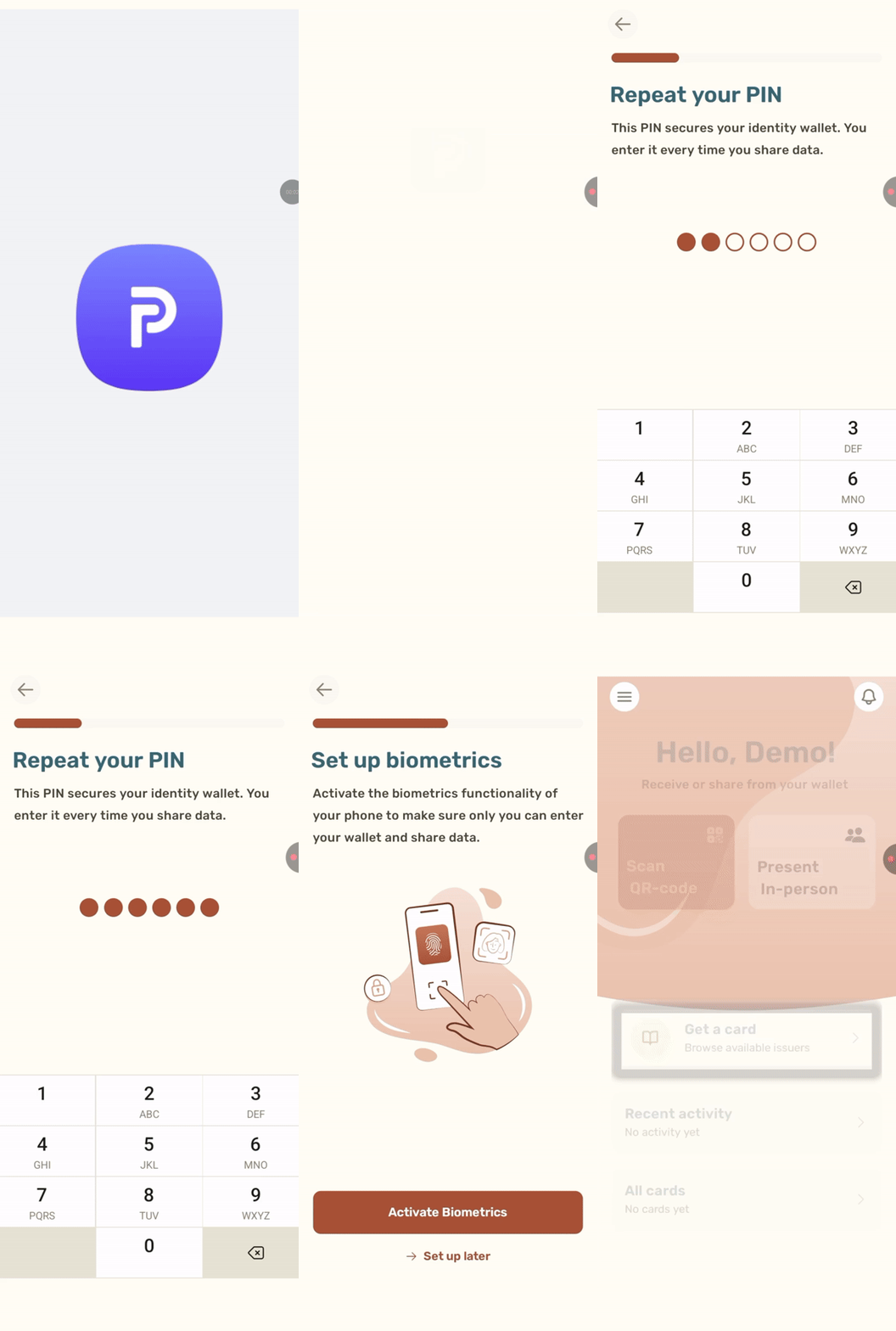
**Where the farmer’s journey begins**
* A new wallet on the farmer’s phone, secured with a PIN and biometrics
* Two registries are ready to issue: the Farmer Registry and the Land Registry
* The farmer signs in to the Farmer Registry and reviews the card before accepting it
* A Farmer Identity Credential, with farmer ID, district and category, lands in the wallet
Português (Brasil)
**Onde a jornada do agricultor começa**
* Uma carteira nova no celular do agricultor, protegida por PIN e biometria
* Dois registros prontos para emitir: o Registro de Agricultores e o Registro de Terras
* O agricultor entra no Registro de Agricultores e revisa o cartão antes de aceitá-lo
* Uma Credencial de Identidade do Agricultor, com ID, distrito e categoria, chega à carteira
Español
**Dónde comienza el recorrido del agricultor**
* Una billetera nueva en el teléfono del agricultor, protegida con PIN y biometría
* Dos registros listos para emitir: el Registro de Agricultores y el Registro de Tierras
* El agricultor inicia sesión en el Registro de Agricultores y revisa la tarjeta antes de aceptarla
* Una Credencial de Identidad del Agricultor, con su ID, distrito y categoría, llega a la billetera
{% endcolumn %}
{% column width="41.666666666666664%" %}
{% endcolumn %}
{% endcolumns %}
***
{% columns %}
{% column width="58.333333333333336%" %}
English
**One consent, two cards, one loan decision**
* The wallet is closed and reopened, and the farmer identity card is still there
* The farmer collects a Land Ownership Credential from a second registry, the Land Registry
* Gramin Bank shows a QR code on a laptop, and the farmer’s phone answers it
* One consent shares both cards, and the bank shows the farmer is eligible, with the maximum loan worked out
Português (Brasil)
**Um consentimento, dois cartões, uma decisão de crédito**
* A carteira é fechada e reaberta, e o cartão de identidade do agricultor continua lá
* O agricultor recebe uma Credencial de Propriedade da Terra de um segundo registro, o Registro de Terras
* O Gramin Bank exibe um QR code em um notebook, e o celular do agricultor responde
* Um único consentimento compartilha os dois cartões, e o banco mostra que o agricultor é elegível, com o valor máximo do empréstimo calculado
Español
**Un consentimiento, dos tarjetas, una decisión de crédito**
* La billetera se cierra y se vuelve a abrir, y la tarjeta de identidad del agricultor sigue ahí
* El agricultor recibe una Credencial de Propiedad de la Tierra de un segundo registro, el Registro de Tierras
* Gramin Bank muestra un código QR en una computadora portátil, y el teléfono del agricultor lo responde
* Un solo consentimiento comparte ambas tarjetas, y el banco muestra que el agricultor es elegible, con el monto máximo del préstamo calculado
{% endcolumn %}
{% column width="41.666666666666664%" %}
{% endcolumn %}
{% endcolumns %}
***
{% columns %}
{% column width="58.33333333333333%" %}
English
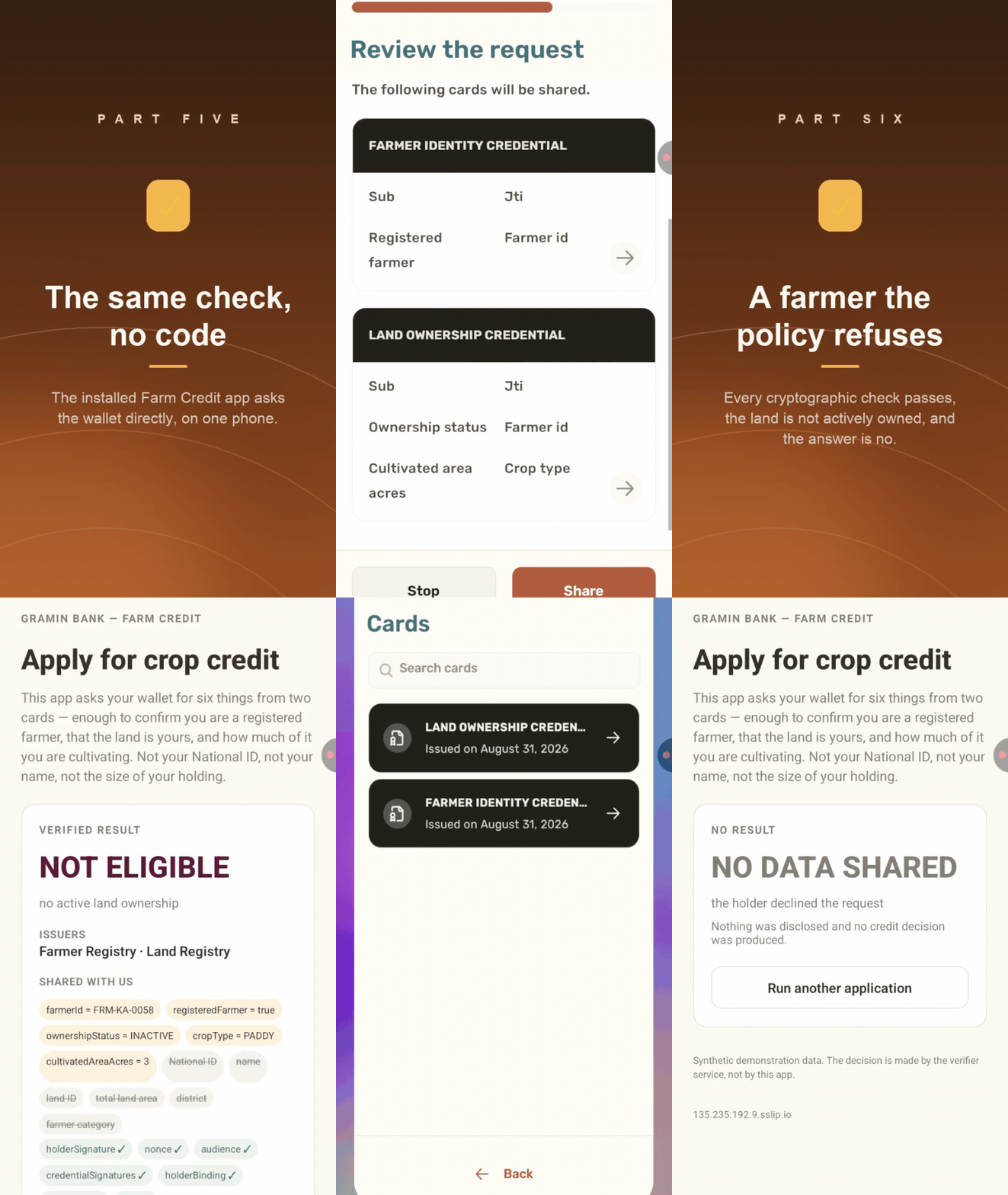
**The same check, different outcomes**
* The Farm Credit app on the same phone asks the wallet directly, with no QR code
* The bank asks for only six facts, not the farmer’s National ID, name or size of holding
* A second farmer passes every cryptographic check but is refused, because the land is not actively owned
* Two genuine cards that don’t belong together are refused, even though every check passes
Português (Brasil)
**A mesma verificação, resultados diferentes**
* O app Farm Credit, no mesmo celular, pede os dados direto à carteira, sem QR code
* O banco pede apenas seis informações, e não o documento nacional, o nome ou o tamanho da propriedade
* Um segundo agricultor passa em todas as verificações criptográficas, mas é recusado, porque a terra não está com posse ativa
* Dois cartões legítimos que não combinam entre si são recusados, mesmo com todas as verificações aprovadas
Español
**La misma verificación, resultados distintos**
* La app Farm Credit, en el mismo teléfono, le pide los datos directamente a la billetera, sin código QR
* El banco pide solo seis datos, no el documento nacional, el nombre ni el tamaño de la propiedad
* Un segundo agricultor pasa todas las verificaciones criptográficas, pero es rechazado, porque la tierra no tiene propiedad activa
* Dos tarjetas auténticas que no corresponden entre sí son rechazadas, aunque se cumplan todas las verificaciones
{% endcolumn %}
{% column width="41.66666666666667%" %}
{% endcolumn %}
{% endcolumns %}
## Presentation
{% embed url="" %}
{% tabs %}
{% tab title="English" %}
**Verify credentials without collecting documents**
* Generate a QR code requesting the credentials you need
* The student scans it and approves what to share
* Credentials arrive directly from the student’s wallet
* Each one is checked instantly: issuer signature, credential status, and revocation
* The result appears on your screen, with nothing to chase and nothing to re-check manually
{% endtab %}
{% tab title="Português (Brasil)" %}
**Verifique credenciais sem coletar documentos**
* Gere um QR code solicitando as credenciais de que você precisa
* O estudante escaneia e aprova o que será compartilhado
* As credenciais chegam diretamente da carteira digital do estudante
* Cada uma é verificada na hora: assinatura do emissor, status da credencial e revogação
* O resultado aparece na sua tela, sem correr atrás de documentos e sem conferência manual
{% endtab %}
{% tab title="Español" %}
**Verifica credenciales sin recopilar documentos**
* Genera un código QR que solicite las credenciales que necesitas
* El estudiante lo escanea y aprueba lo que se va a compartir
* Las credenciales llegan directamente desde la billetera digital del estudiante
* Cada una se verifica al instante: firma del emisor, estado de la credencial y revocación
* El resultado aparece en tu pantalla, sin perseguir documentos y sin revisiones manuales
{% endtab %}
{% endtabs %}
### Try it yourself
To get the demo credentials into your wallet, you'll need the sandbox and the demo wallet app.
* **Presentation Sandbox:** [sandbox.rc.org](https://sandbox-rc.sunbird.org/presentation/)
* **Sunbird Demo Wallet:** [Download the Android APK](https://drive.google.com/file/d/1BeEciu6uTfZCkVzqRx09FJvarUSBYhRT/view?usp=sharing)
Use one of these test accounts to get the credentials in the wallet:
| Institute | Email | Password |
| ---------- | ------------------------------ | ---------- |
| DPS | | abcd\@1234 |
| St Stephen | | abcd\@1234 |
## More demos
Have a demo of Sunbird RC for another domain? Share it on [GitHub Discussions](https://github.com/orgs/Sunbird-RC/discussions).
---
# Agent Instructions
This documentation is published with GitBook. GitBook is the documentation platform designed so that both humans and AI agents can read, navigate, and reason over technical content effectively. Learn more at gitbook.com.
## Querying This Documentation
If you need additional information that is not directly available in this page, you can query the documentation by asking a question.
Perform an HTTP GET request on the following URL with the `ask` and `goal` query parameters:
```
GET https://rc.sunbird.org/engage/use-case-walkthroughs.md?ask=&goal=
```
`ask` is the immediate question: it should be specific, self-contained, and written in natural language.
`goal` is what the user is ultimately trying to achieve, the reason they need the answer. Sharing it helps GitBook give you a better, more relevant answer. A goal is most helpful when it describes the outcome the user wants rather than restating the question. For example, with `ask=how do I create an API token`, a goal like `automate deployments from our CI pipeline` lets GitBook tailor the answer to that use case.
The response will contain a direct answer to the question and relevant excerpts and sources from the documentation.
Use this mechanism when the answer is not explicitly present in the current page, you need clarification or additional context, or you want to retrieve related documentation sections.